
StreamTime: Real-Time Video Timing Tool
Overview
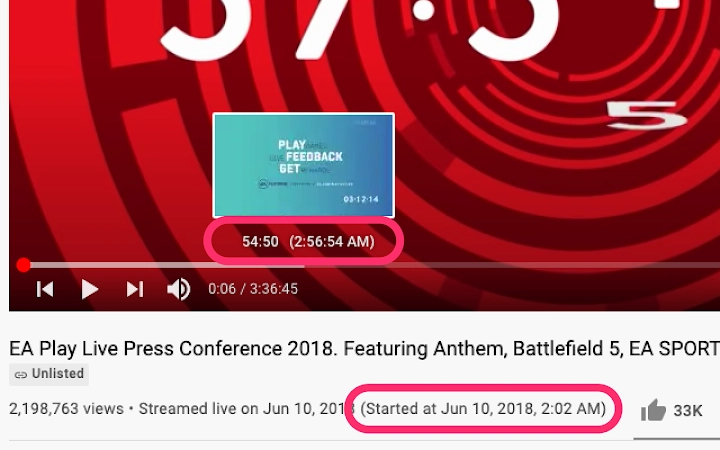
StreamTime is a productivity-focused desktop application designed to enhance the viewing experience on YouTube and Twitch by providing real-time time information. The software displays the video publishing time, current time on the seek bar, and timestamps within live chat—features particularly useful for content creators, researchers, and stream viewers who rely on precise timing. By offering these details directly within the browser environment, StreamTime streamlines workflows that require tracking specific moments in long-form videos or live streams.
The tool is intended for users who need to reference exact timestamps for content analysis, commentary, or synchronization tasks. Developed by StreamTime, the application is optimized for both Windows and Mac platforms, ensuring accessibility across major desktop operating systems. While specific developer background is not detailed, the tool’s functionality suggests a focus on utility and precision.
It is especially suited for professionals and enthusiasts working with video content, such as video editors, podcasters, or community moderators managing live chat interactions. The software is available at no cost, making it accessible to a broad audience seeking a simple yet effective time-tracking solution.
Key Features & Capabilities
- Video Publishing Time Display – Shows the exact date and time when a video was published, allowing users to quickly assess content freshness and relevance.
- Seek Bar Time Indicator – Displays the current playback time in real time on the seek bar, improving navigation accuracy during video review.
- Chat Timestamp Integration – Presents timestamps for messages in live chat, helping users correlate comments with specific moments in the stream or video.
- Browser-Based Operation – Functions directly within supported web browsers without requiring complex setup or native app integration.
- Minimal System Footprint – With a file size of 1.2 MB, the application is lightweight and designed to operate efficiently without impacting system performance.
These features are particularly beneficial in scenarios such as analyzing historical video content, preparing commentary scripts, or identifying key moments in live streams. For example, a content creator reviewing a past Twitch broadcast can use StreamTime to pinpoint exactly when a viewer made a significant comment. Similarly, a researcher studying trends in online video engagement may use the tool to correlate chat activity with video milestones. The application’s ability to function within the browser environment ensures minimal disruption to existing workflows. Since no additional plugins or extensions are required beyond standard browser compatibility, the tool maintains broad accessibility across different user setups.
User Interface, Workflow & Performance
The user interface of StreamTime is designed with simplicity and clarity in mind, focusing on delivering essential time data without visual clutter. The tool integrates seamlessly into the browser window, displaying time information in a non-intrusive format near the video player or chat area. Navigation is intuitive, with no complex menus or configuration steps required—users can begin using the software immediately after installation.
Workflow efficiency is enhanced by the real-time updating of timestamps, allowing for dynamic tracking without manual refreshes. The application operates in the background, minimizing user interaction while maintaining consistent performance. Performance observations are based on general software behavior patterns, as specific resource usage details were not provided.
The developer did not specify CPU or RAM consumption metrics. However, given the tool’s small size and browser-based nature, it is expected to operate smoothly on modern systems. Stability appears to be prioritized, as the software is designed to maintain functionality across different browser sessions and video playback states.
No known compatibility issues were reported at the time of release.
Compatibility & System Requirements
StreamTime is compatible with both Windows and Mac operating systems, supporting a broad range of desktop environments. The software version is 1.0.0, released on July 15, 2024. Installation requires 1.2 MB of disk space, indicating a minimal footprint and quick setup process.
The developer did not provide additional system requirements, so exact hardware specifications such as RAM, CPU, or graphics capabilities are not available. Compatibility information was partially provided, confirming support for Windows and Mac platforms. No mention was made of specific browser versions or additional dependencies.
Users are advised to ensure their system meets general desktop software requirements for running modern web browsers. The lack of detailed system requirements suggests the application is built to function on standard configurations without demanding high-end hardware.
Pros and Cons
Pros
- Free to use with no hidden costs
- Lightweight at only 1.2 MB
- Real-time time display for video and chat
- Designed for YouTube and Twitch users
- Simple, intuitive interface with minimal setup
Cons
- Exact system requirements were not specified
- Performance metrics such as CPU/RAM usage were not provided
- Functionality limited to YouTube and Twitch platforms
- No advanced customization options described
- Browser dependency may limit use in some environments
Is StreamTime compatible with all web browsers?
The application is designed for use with major web browsers, though specific browser compatibility was not detailed in the release information.
Is StreamTime safe to download and use?
StreamTime is a free desktop application developed by StreamTime. No security vulnerabilities were reported at the time of release. Users are advised to download only from official sources.
How often does StreamTime receive updates?
As of the release date, no update frequency details were provided. The current version is 1.0.0.
What type of license does StreamTime use?
StreamTime is available at no cost. The specific license type was not disclosed in the provided information.
Can StreamTime be used offline?
Since StreamTime operates within the browser environment, it requires an active internet connection to access YouTube and Twitch content. Offline functionality is not supported.
Final Thoughts + CTA
StreamTime delivers a focused, efficient solution for users who need precise time tracking during video playback on YouTube and Twitch. Its ability to display publishing time, seek bar timing, and chat timestamps addresses a clear gap in the user experience for content creators, researchers, and stream viewers. The application’s lightweight design and free access make it an attractive tool for those seeking a no-frills enhancement to their viewing workflow.
While detailed system specifications and performance data are not available, the tool’s minimal footprint suggests broad compatibility across modern systems. For users who frequently analyze or reference video content, StreamTime offers a practical advantage. The lack of advanced customization may limit power users, but for its intended purpose, it performs reliably.
Overall, StreamTime stands out as a valuable utility for anyone working with timed video content on major streaming platforms. Download StreamTime now.







